I’m pleased to announce a new release of Forebears that adds powerful ways to explore your paternal line, stay on top of family anniversaries, and edit your tree more intuitively—along with a clearer experience on Mac and an updated User Guide.
Y-DNA Tree in Classic Tree
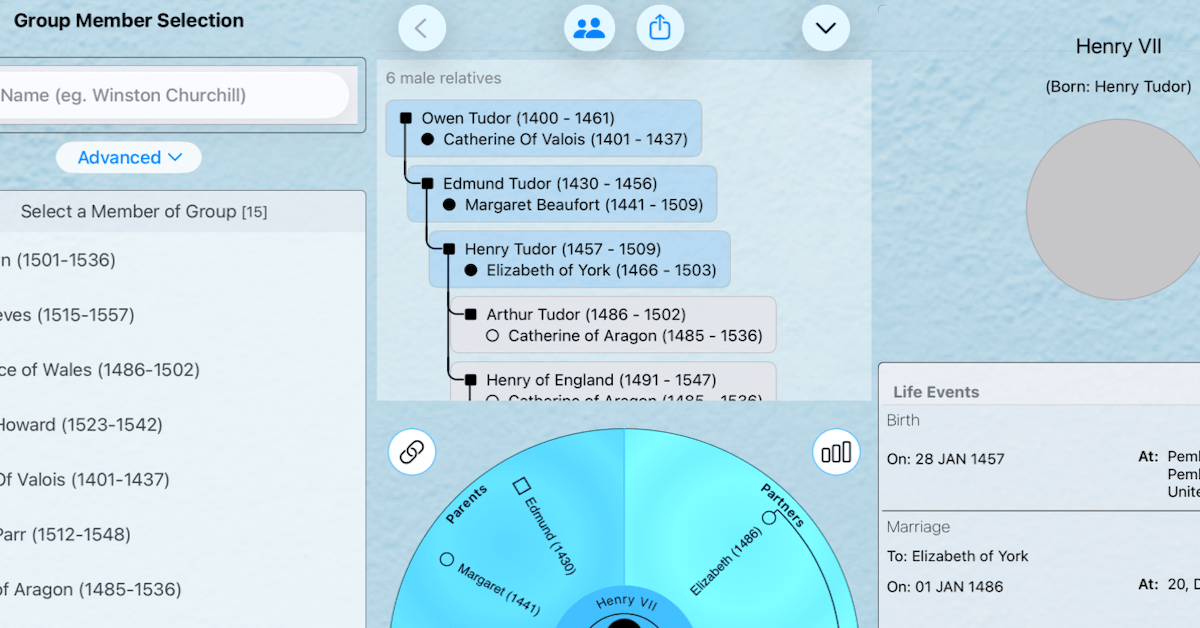
The app now lets you view and export a male-only lineage directly from the Classic Tree. When the focal person is male, a Y-DNA button appears in the toolbar. Tap it to switch the tree to the Y-DNA view:
- The tree walks up through fathers to the earliest known male ancestor, then down through sons only (with partners and dates shown in each cell).
- The direct line from that root male to the focal person is highlighted so the paternal line is easy to see at a glance.
- Tap the export button to create a GEDCOM file containing only the people in that Y-DNA tree—ideal for sharing with genetic genealogy projects or other apps. The file is named after the focal person and their record id (e.g. John Smith (I3) Y-DNA.ged), so it’s clear whose line it is.
This feature was requested by Alain—thank you for the suggestion; it’s now in the app because of you.
Anniversary Calendar
Forebears now includes an Anniversary Calendar that does something Apple’s Birthdays calendar can’t: it’s generated from your family tree, not from Contacts. So you get every anniversary that matters—birthdays, yes, but also marriages and death anniversaries of loved ones—in one place, without relying on contact records. You can share that calendar with family so everyone has the same dates, without sharing anyone’s contact details. For me, that’s opened up a new way to use Forebears: not only for researching the past, but for staying on top of the living family—all the grandchildren, cousins, and in-laws—so we don’t miss the dates that matter. My wife nudged me to build this so we could actually remember them; I hope it helps your family too.
Editing Centred on the Individual
Editing is now driven from the Individual screen, so you can change details without losing context. Group-wide editing sits above Circle-based editing, so you can work at the level that fits the task—whether that’s updating something for the whole group or refining relationships in the Circle. All editing flows from the person you’re viewing, which keeps the flow consistent.
Improved Mac Screen Layouts
Mac layouts have been updated so Forebears makes better use of the larger screen. Panels and toolbars are arranged to make navigation and editing more comfortable when building or reviewing a large tree on desktop.
Updated User Guide
The User Guide has been updated to cover these features: the Y-DNA tree and export, the Anniversary Calendar, the new Individual-led editing flow, and the Mac layout changes. Whether you’re new to Forebears or returning after an update, the guide is there to help you get the most out of the app.
Get Started
This release is available now. If you’re already using Forebears, update to the latest version from the App Store. Your existing data continues to work as before—no migration needed.
Whether you’re just starting your family tree or managing a large, multi-generational tree, Forebears keeps making it easier to record, organize, and explore your family history.
Download Forebears and start telling your family story today.
 Opsisoft Apps