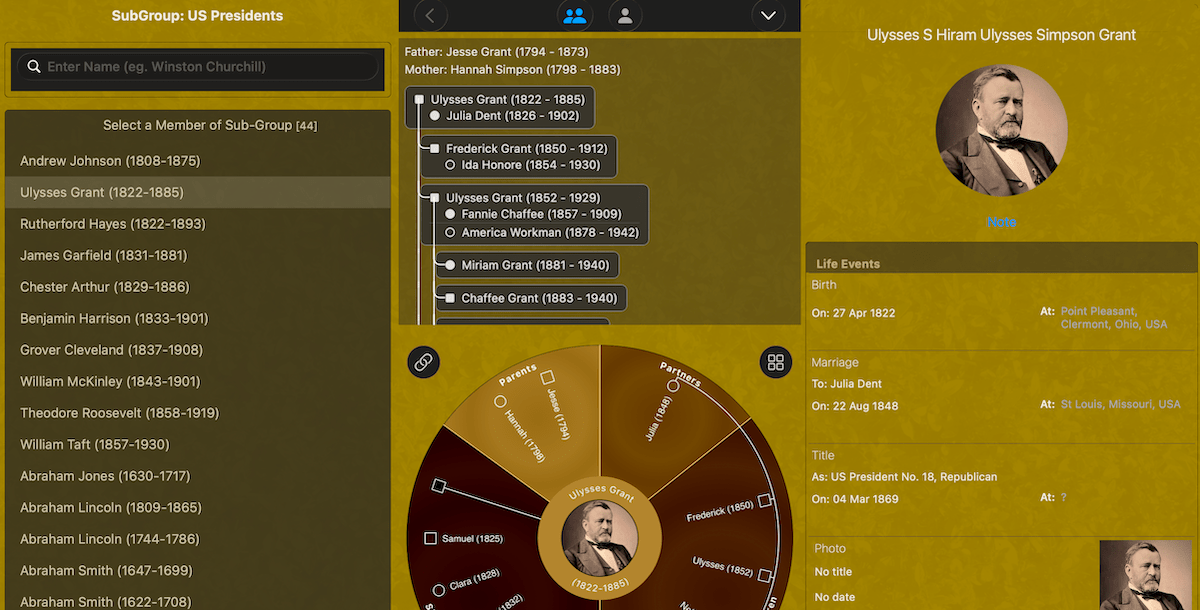
We’re excited to announce the release of Forebears 4.0, a significant update that brings powerful new features and improvements to help you build and explore your family tree with greater ease and clarity.
Enhanced Date Support
One of the most requested features is now here: date ranges and periods. Whether you’re recording a period of service (“From 1939 to 1953”) or an approximate timeframe (“After 1920”), Forebears now handles these dates naturally. You can specify:
- Specific dates (as before)
- Start date only
- End date only
- Full date ranges (from…to)
All date ranges are fully compatible with GEDCOM import and export, so your data remains portable and standards-compliant.
Improved Address Display
Long addresses are now much easier to work with. Address fields support multiple lines, making it simple to read and edit complete addresses. When importing from GEDCOM files, addresses are now captured more completely, including both place names and street addresses.
Enhanced Note Management
Notes have received a major upgrade. Person-level notes now appear in a dedicated pop-up view for better readability, and formatted notes (bold, italic, underline) are preserved when exporting and importing your family trees. A dedicated button appears whenever notes exist, making them easy to access.
More Flexible Group Management
Adding People to Groups: You can now add people to existing groups without requiring them to be direct relations. This is perfect for groups with separate family branches or unconnected individuals who share a common theme.
Seed Group Management: The demonstration groups (Royal Family and US Presidents) can now be edited and deleted like your own groups. If you’ve deleted them and want them back, you can reinstall them anytime from Settings.
Enhanced Descendant Tree View
The descendant tree view has been completely redesigned for better clarity and navigation:
Partner Display
Partners are now shown directly within each person’s cell, making family relationships immediately clear
Visual Indicators
- Partners with children are marked with numbered badges (¹, ², ³…)
- Partners without children use hollow icons for quick visual identification
- Children display matching numbers, so you can instantly see which partner produced which children
Parent Display
The focal person’s parents are now shown at the top of the tree with clear “Father:” and “Mother:” labels (or “[Unknown]” if not available)
Improved Navigation
Tap any person or partner in the tree to navigate to them. When the tree is expanded to full height, it stays expanded as you navigate—no more collapsing back to half-height unexpectedly
Better Organization
Multiple partners are clearly displayed with visual connections showing family relationships at a glance
Improvements & Fixes
This release also includes numerous bug fixes and performance improvements:
- Fixed issues where addresses were being cut off or missing after importing GEDCOM files
- Improved display of dates and addresses with clearer labels and formatting
- Enhanced group deletion handling to prevent empty screens
- Fixed Mac Catalyst display issues with dark overlays
- Various stability and performance improvements
Get Started
Forebears 4.0 is available now. If you’re already using Forebears, simply update to the latest version. All your existing data will continue to work perfectly—no migration required.
Whether you’re just starting your family tree research or managing a complex multi-generational tree, Forebears 4.0 makes it easier than ever to record, organize, and explore your family history.
Download Forebears 4.0 and start telling your family story today.
 Opsisoft Apps